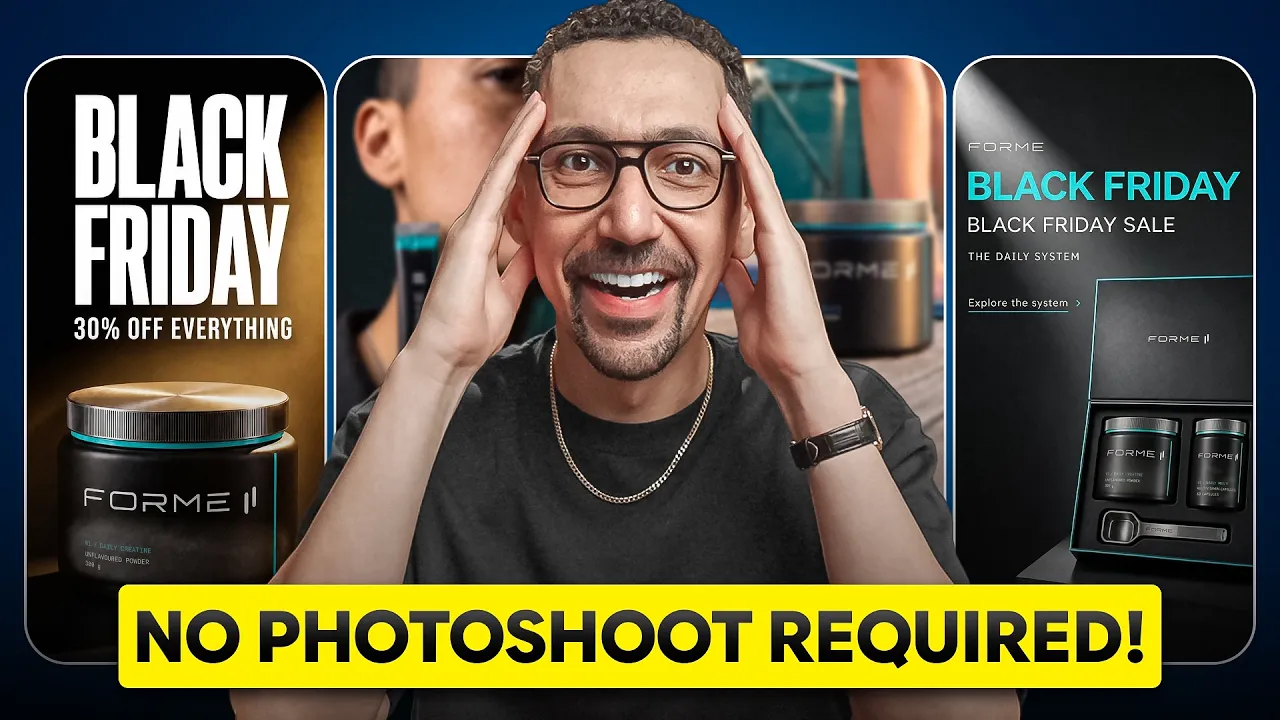
Black Friday Ads With Riverflow AI: 40 Creatives From One Product Photo
A Black Friday ad set isn't one ad. It's four offers in three sizes, plus video, and normally that means a designer, models, photographers and editors. I built all 40 pieces in one afternoon inside Riverflow, starting from a single product photo. Here's the exact workflow, including the review step that catches a bad label before you export.
Software
8 min
This is where most Black Friday creative goes terribly wrong.
Disclosure: Riverflow sponsored the video this post is based on. The workflow and opinions are my own. Some links below are affiliate links.
Deal: Start building your Black Friday ad set in Riverflow with my link. https://go.davidalex.com/riverflow" rel="sponsored nofollow">Try Riverflow
Quick answer
You can build a full Black Friday ad set from one clean product photo in Riverflow AI in an afternoon. Add your brand from your URL, build a custom style, generate three hero images, turn them into template ads, make four offer versions, batch resize to 4:5, 1:1 and 9:16, review with the AI judge, then animate heroes into video.
The 40-ad plan | Count |
Hero images from one photoshoot | 3 |
Offers per hero (early access, Black Friday, Cyber Monday, last chance) | 4 |
Sizes per ad (4:5 feed, 1:1 carousel, 9:16 stories and Reels) | 3 |
Static ads (3 × 4 × 3) | 36 |
Vertical video ads | 4 |
Total creatives | 40 |
How I tested this
I built the whole ad set on camera inside Riverflow, starting from a product that was already in my brand account. I created a dark, warm holiday style, ran one photoshoot, built static ads from templates, made the four offer versions, batch resized everything, worked through the review queue and generated four video ads. It took one afternoon at my computer, with no camera, no studio and no design team.
What is Riverflow AI?
Riverflow is an AI creative platform built for product brands. It connects your products, your brand rules and your creative workflows, so you can make on-brand photoshoots, ads, videos and edits for every campaign.
The difference from a plain image generator is that it works from your actual catalog, logo, fonts and colors. Your product stays your product in every image, so the whole campaign feels consistent. It's built by the team at Sourceful. Riverflow says its model ranks at the top against tools like ChatGPT, and that brands using it generated over $20 billion in annual sales last year.
Pick Riverflow if you sell products and want a full campaign of on-brand creative without a shoot, whether you launched last week or run a nine-figure brand.
How many ads do you need for Black Friday?
A lot more than one. A Black Friday ad set is really four offers:
Early access ("Early access starts now")
The sale itself ("Black Friday, 30% off everything")
Cyber Monday ("Cyber Monday, one more day")
Last chance ("Last chance, ends tonight")
Each of those has to show up in the feed, in stories and in Reels. Three hero images times four offers times three sizes gets you to 36 static ads. Add four video ads and you're at 40 pieces of creative.
And if you run Riverflow from your terminal or with an AI agent, you can automate the loop around your top-performing campaigns. That's how 40 turns into 400 or 4,000.
How to make Black Friday ads with AI, step by step
Step 1: Get your brand into Riverflow
If your brand isn't in yet, drop in your website URL. Riverflow pulls your logo, fonts, colors and product images, and setup takes a few seconds. I walk through it in my Riverflow setup video and in my Riverflow AI tutorial.
One tip before you start: use a clean, well-lit product photo, ideally on a white background. That single photo is what every ad gets built from, so it's worth getting right.
Step 2: Build a Black Friday style (don't just prompt "Black Friday ad")
This is where most Black Friday creative goes wrong. People type "I need a few ads for Black Friday" into an AI tool and take whatever comes out, which is why so many holiday ads look the same.
Build a style instead:
Go to Styles and click Create new.
Upload a few reference images. You can upload up to five, and you don't need many for it to work.
Save it as your own style.
For this campaign I went dark and warm, which fit the brand and the holidays.
Step 3: Generate your hero images with a photoshoot
Click New Photoshoot, pick a scene (there are a lot to choose from), select your product and add the style you just made. I asked for four images.
The results had the same lighting, the same mood and the same palette, and the label on the product was perfect. I picked three as my hero images. Everything after this gets built on those three. You can keep generating if you want more options.
Step 4: Turn the heroes into static ads with templates
Go to Ads and pick a template from the library. I chose one with room for a headline and an offer. Then:
Add one of your hero images
Add your logo
Select your brand fonts and colors
Update the copy with a headline and your offer
A few moments later you have your first Black Friday ad. It kept the image quality, used the actual brand font, and the offer was easy to read. Repeat for the other two heroes.
Build your Black Friday ads in Riverflow
Step 5: Create the four offer versions
From each approved ad, create variations and change only the copy. That's how you get early access, Black Friday, Cyber Monday and last chance versions of every hero.
Keeping the image the same matters for testing. When one ad wins, you know it was the offer, not the photo. Picture 7:00 AM on Black Friday: one version is pulling ahead, and you can go back into Riverflow and make five more just like it.
Step 6: Batch resize every ad to 4:5, 1:1 and 9:16
Now you have 12 ads, all in one size. To fix that:
Click Batch on the left, then Choose an action.
Select Change Aspect Ratio.
Select your ads as the starting images.
Ask for three outputs per ad: 4:5 for the feed, 1:1 for carousels and 9:16 for stories and Reels.
Click Preview, then Approve and Submit.
It reframes the shot for each size, so the packaging, label and proportions stay the same across all of them. If you sell in more than one country, the same menu has a translation action, so you can run the whole set in another language.
Step 7: Review every output with the AI judge
This is the step most people skip. When a batch finishes, an AI judge has already compared every output against the original and given each one a score and a recommendation. A before-and-after slider lets you drag across and see exactly what changed.
You approve, reject or retry and move through the queue. Riverflow says over 95% of outputs get rated on-brand or production-ready by brand teams, so your job is catching the few that aren't. If a label looks off, hit Retry or fix the product details right on the image. Then export the creative.
Step 8: Turn hero images into vertical video ads
Open a hero image and click Generate video at the top. Pick a motion, a model and a size. I went vertical for Reels and TikTok, typed one line about what I wanted, and hit Enhance prompt so it wrote the full prompt for me.
A few minutes later the video was ready. Because it started from a shot I'd already approved, the product, scene and style carried over and it matched the rest of the campaign. Do that across the other heroes and you have four video ads.
What the finished Black Friday ad set looks like
Every offer, every size, static and video, and it all looks like one campaign from one brand, as if you'd scheduled a shoot months ago. Normally that takes a designer, models, photographers, videographers and editors. This was an afternoon at my computer.
And if a product sells out Friday morning or you change the offer, you don't call anybody. You come back in, swap the copy or the product, run the batch, and you're live again.
Riverflow vs a traditional Black Friday shoot
Traditional shoot | Riverflow | |
Who you need | Designer, models, photographers, videographers, editors | You, at your computer |
Starting point | A shoot scheduled months ahead | One clean product photo |
Time to a full ad set | Months of planning | One afternoon |
Sizing for feed, stories, Reels | Not covered in the video | Batch aspect ratio action |
Quality check | Not covered in the video | AI judge score plus before-and-after slider |
Changing an offer mid-sale | Not covered in the video | Swap the copy or product and rerun the batch |
Video ads | Videographers and editors | Generated from approved hero images |
Where to use your Black Friday creative
The 4:5 versions go in the feed, the 1:1 versions work for carousels, the 9:16 versions go to stories and Reels, and the vertical videos go to Reels and TikTok. If you're planning the rest of your Black Friday push, see my Omnisend review or Flodesk review, and if you need a sale page to send traffic to, here's my roundup of AI landing page builders.
How much does Riverflow cost?
Riverflow sells credit-based plans. Here's what its pricing page listed on October 19, 2026. The page didn't list dollar amounts in its text or mention a free trial:
Plan | Monthly credits | Extras |
Growth | 6,000 | 10 bonus video and 10 bonus static ad generations a month |
Scale | 16,000 | 30 bonus video and 30 bonus static ad generations a month |
Business | 70,000 | 30 bonus video and 30 bonus static ad generations a month |
Enterprise | Custom | Contact sales |
Check the current prices on Riverflow's site, since you can pay monthly or yearly.
Getting started
Start with one good product photo, build the style before you generate anything, and don't skip the review queue. That's the whole workflow.
Black Friday ads FAQ
How do I make Black Friday ads with AI?
Start from a clean product photo, build a custom style from a few reference images, generate hero shots, then add your offer copy with ad templates. In Riverflow you can then batch resize every ad and turn the heroes into video.
What sizes do Black Friday ads need?
Plan on 4:5 for the feed, 1:1 for carousels and 9:16 for stories and Reels, plus vertical video for Reels and TikTok. Riverflow's batch action creates all three from each ad.
How many ad creatives should I run for Black Friday?
Plan one version per offer (early access, Black Friday, Cyber Monday, last chance) in every placement size. Three hero images across four offers and three sizes is 36 static ads before you add video.
Can AI keep my product label accurate in ads?
Riverflow works from your real product images, and its AI judge scores each output against the original. If a label looks off, you can retry or fix the product details on that image before export.
When should I start making Black Friday ads?
Before the sale starts, so early access ads can run first. With this workflow the full set takes about an afternoon, which leaves time for testing and making more versions of winners.